← Semua panduanJentra Clinic · Panduan 2
Cara menyusun jadual tugas mingguan
Anda membuka jadual tugas minggu hadapan. Kemudian anda mengisi slot yang kosong.
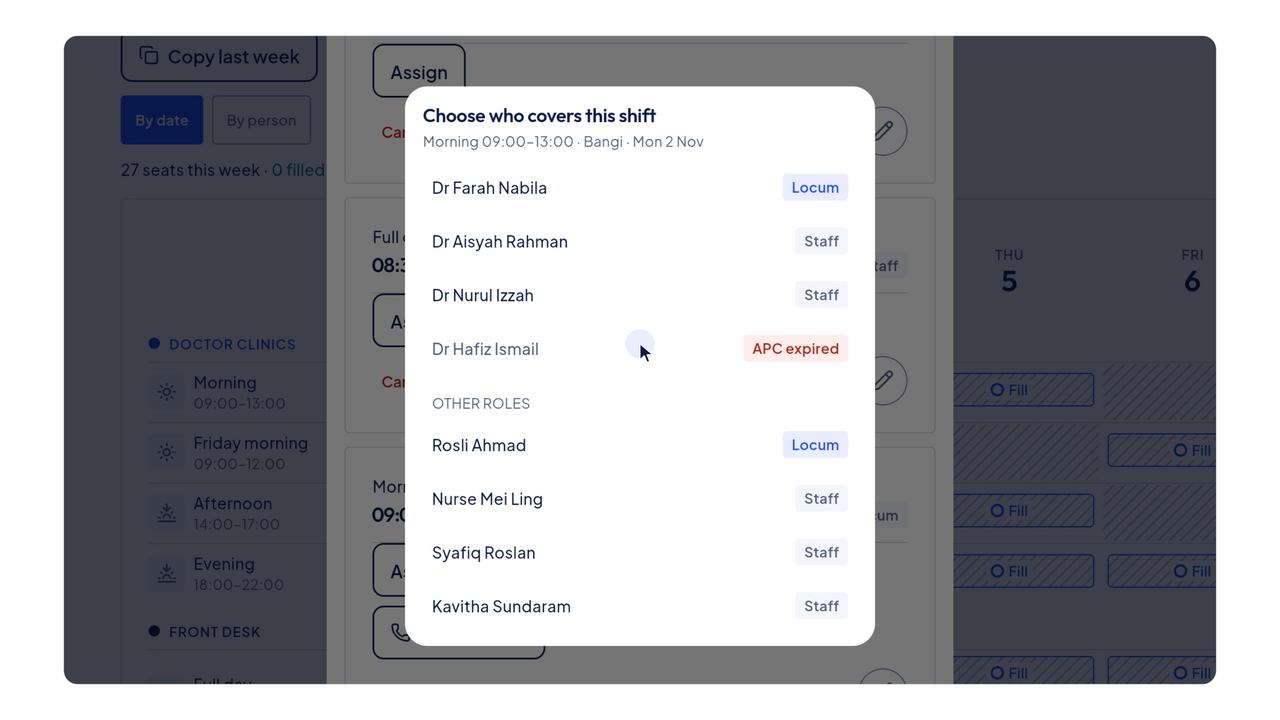
Video ini dimainkan daripada YouTube apabila anda menekan butang main. YouTube tidak menyimpan kuki sebelum itu. Sari kata disediakan dalam bahasa Inggeris.
Langkah-langkahnya
Video dan langkah-langkah ini dalam bahasa Inggeris.
- Click Roster in the menu on the left.
- The tabs at the top choose the clinic. Click Bangi.
- Click the arrow on the right to move to next week.
- An empty seat says Fill. The count at the top shows how many seats are left.
- Click Fill on Monday morning.
- The window lists that morning's shifts. Click Assign on the doctor's shift.
- Now choose who covers it. Each name shows whether they are staff or a locum.
- A doctor whose APC has expired is marked in red.
- Dr Aisyah Rahman now covers Monday morning. Close the window.
- The seat shows her name, and the count drops by one.
- Click By person to see each person's week in one row.